Sell Out Your Event Faster With FestFlow SMS Campaigns (500 Free Per Month)
Sell Out Your Event Faster With SMS Campaigns
If email is the channel that sells the ticket, SMS is the channel that gets the person to actually show up.
That's not a throwaway line. It's the cleanest way I can describe why both tools sit side-by-side in your FestFlow dashboard — and why most successful event organisers run both, not one or the other.
Here's the awkward truth most organisers learn the hard way: people buying tickets two weeks out is not the same as those people walking through the door on the night. Plans change. People forget. Cheaper events knock yours off the calendar. By the time doors open, you've usually lost 20–30% of your "confirmed" audience to no-shows, last-minute drop-offs, and "wait, that was tonight?" texts at 8pm.
SMS is the cure for that.
The numbers that matter
Email open rates sit around 25% on a good day. SMS open rates sit at roughly 98%, and the average text is read within three minutes of being delivered. There's no spam folder. There's no algorithm deciding whether to show it. It just lands on the phone, makes a sound, and gets read.
For an event organiser, that's the difference between hoping people remember and knowing they got the message.
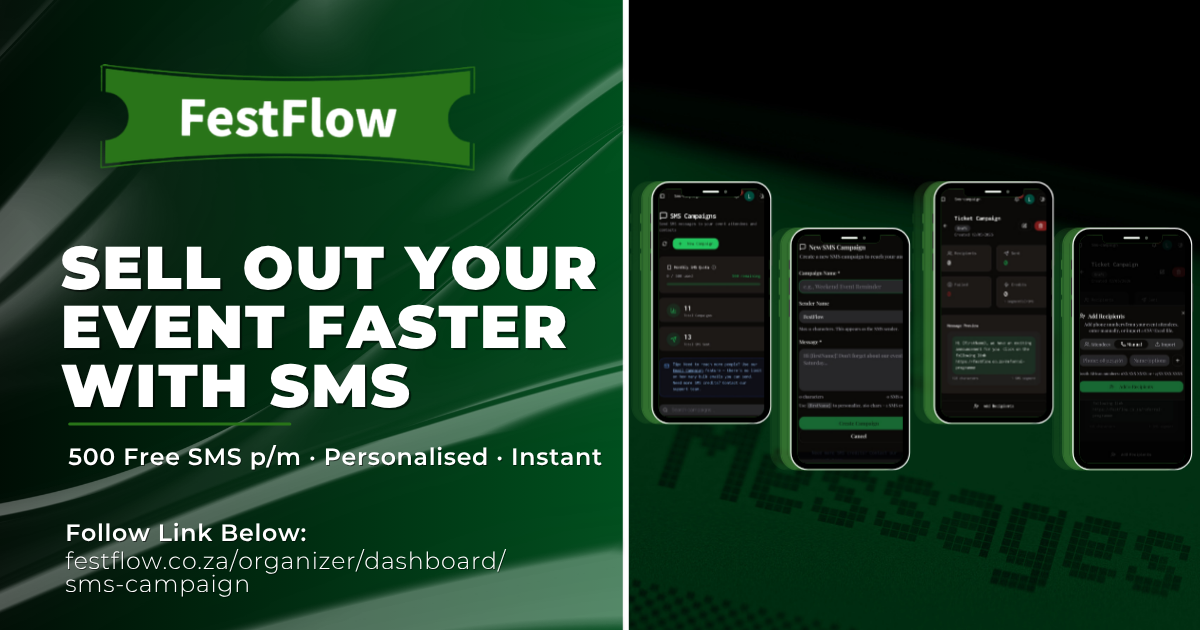
What's in the SMS Campaigns feature
In your organiser dashboard under SMS Campaigns, you get:
500 free SMS credits every month — more than enough for almost every event you'll run in a given month
Pull your audience in three ways — from past event attendees with phone numbers, by importing a CSV/Excel file, or by pasting numbers manually
Personalisation built in — drop {firstName} into your message and each recipient gets their actual first name
Custom sender ID — texts go out from "FestFlow" by default, or change it to your brand name (max 11 characters)
Smart filtering — duplicate numbers and invalid SA formats are auto-skipped, so you only spend credits on numbers that'll actually deliver
Live progress tracking — watch sent and failed counts roll in real-time as your campaign goes out
Auto pause and resume — long sends pause cleanly without losing data; hit "Resume" and they pick up where they left off
The 500 credits refresh at the start of every month. If you need more, you can request bonus credits from support.
The four moments where SMS earns its place
Here's the strategic question: with 500 free SMS credits a month, when should you actually use them?
1. The ticket launch window. When tickets first go on sale, your warm audience is the easiest to convert. An SMS landing in their pocket the moment tickets drop ("🎫 Tickets are LIVE! Early-bird R150 — link in your email") consistently beats relying on social posts alone, because people miss social posts.
2. The last-chance push. Tickets closing tomorrow? Door price jumping from R150 to R200? An SMS at 4pm the day before reliably drives a meaningful spike in sales. Email won't catch the people on the fence — SMS will.
3. The day-of reminder. This is the no-show killer. Send everyone with a ticket a quick text the morning of the event — date, doors time, venue, what to bring. You will see your attendance rate climb noticeably the first time you do this.
4. Urgent changes. Venue change, weather call, set time moved, parking issue — SMS reaches people in time. Email won't.
Everything else — full event announcements, newsletters, partner co-promos, behind-the-scenes content — belongs in Email Campaigns, where sends are unlimited and you've got room to design something rich.
How to send your first SMS campaign — five quick steps
Open SMS Campaigns. From your organiser dashboard, click Marketing → SMS Campaigns → New Campaign.
Name the campaign and write your message. The campaign name is internal (just for you). The message is what hits people's phones — aim for under 160 characters if you can (longer messages cost more than one credit per recipient). Drop in {firstName} for personalisation.
Set your sender name. Default is "FestFlow" — but if you've got brand recognition, change it to your event or organisation name (max 11 characters, alphanumeric).
Add recipients. Pick one of three sources:
Event Attendees — tick the events you've run on FestFlow and the system pulls all ticket holders with phone numbers attached
Manual — paste in numbers one by one (great for VIP lists or smaller drops)
Import — drop a CSV or Excel file with a phone column (phone, phoneNumber, cell, or mobile all work; optional firstName and lastName columns get used for personalisation)
Hit Send. Click "Send Now" and watch the sent/failed counters update live. The system handles batching, rate limits, retries on transient errors, and bad numbers automatically.
That's it. Most first-time campaigns are out the door in under five minutes.
Pro tips from sending thousands of these
Keep it under 160 characters. Each SMS segment is 160 characters. Go over and you're spending two or more credits per recipient. For a 100-person send, that's the difference between using 100 credits and 200. Write tight, link out for detail.
Always include a link. "Tickets here → festflow.co.za/e/yourevent" works far better than "log in to your account to purchase tickets…" — people will not log in from an SMS, ever.
Set a sender name people recognise. "FestFlow" is fine, but if your audience knows your brand directly, set it to that. People read messages from senders they trust at much higher rates than unknown ones.
Respect the time window. SMS bypasses every "do not disturb" setting most users have, so use that responsibly. 9am to 9pm is the polite window in South Africa. Avoid before 8am or after 9pm unless something is genuinely urgent.
Always personalise. "Hi Sarah, tickets are live 🎫" outperforms "Hi everyone, tickets are live 🎫" by a noticeable margin. The {firstName} tag takes two seconds to add.
Don't spam. Two SMS per event is the sensible maximum (one for the launch, one for the day-of reminder). Three is the ceiling. If you're hitting four or five, you're asking to get reported and lose your audience permanently.
Test on yourself first. Add your own number as a recipient on the first campaign, send it, check the formatting on your phone, then send to the full list. Catches typos and broken links every single time.
The bottom line
SMS isn't trying to replace email. It's the closing tool — the channel you use in the high-stakes moments where attention is everything: launching a ticket sale, closing the last few seats, and getting your audience physically through the doors on event night.
For most South African event organisers, 500 free SMS a month is enough to cover every ticket launch, every last-call push, and every event-day reminder you'll need. Used strategically, it's the single most underrated tool for actually selling out an event and getting bums in seats.
Head to festflow.co.za/organizer/dashboard/sms-campaign to fire off your first one.
Your audience already opens their phone roughly 96 times a day. Now go put your event right in front of them.
Share this post
Written by
FestFlow Admin
FestFlow Team