Sell Out Your Next Event With FestFlow Email Campaigns (Free, Unlimited Sends)
Most organisers I speak to spend their marketing budget in the wrong place.
They put the bulk of it into Instagram ads, flyers, hyped-up promoter networks — anything to reach new people. Meanwhile, sitting quietly in their old ticket exports, ticket spreadsheets, and old WhatsApp groups, is the single highest-converting audience they will ever have access to: the people who actually showed up to their last event.
Those people already paid you money. They already had a good time (hopefully). They already trust the brand. Selling them a ticket to the next event is roughly five to ten times easier than convincing a stranger on Instagram who's never heard of you.
The catch is that most organisers have no easy way to actually contact them.
That's exactly what we built Email Campaigns for. It's free, it's unlimited, and it's designed to help you sell out your next event using the audience you already have.
What you can actually do with it
Here's the short version of what's in your dashboard under Marketing → Email Campaigns:
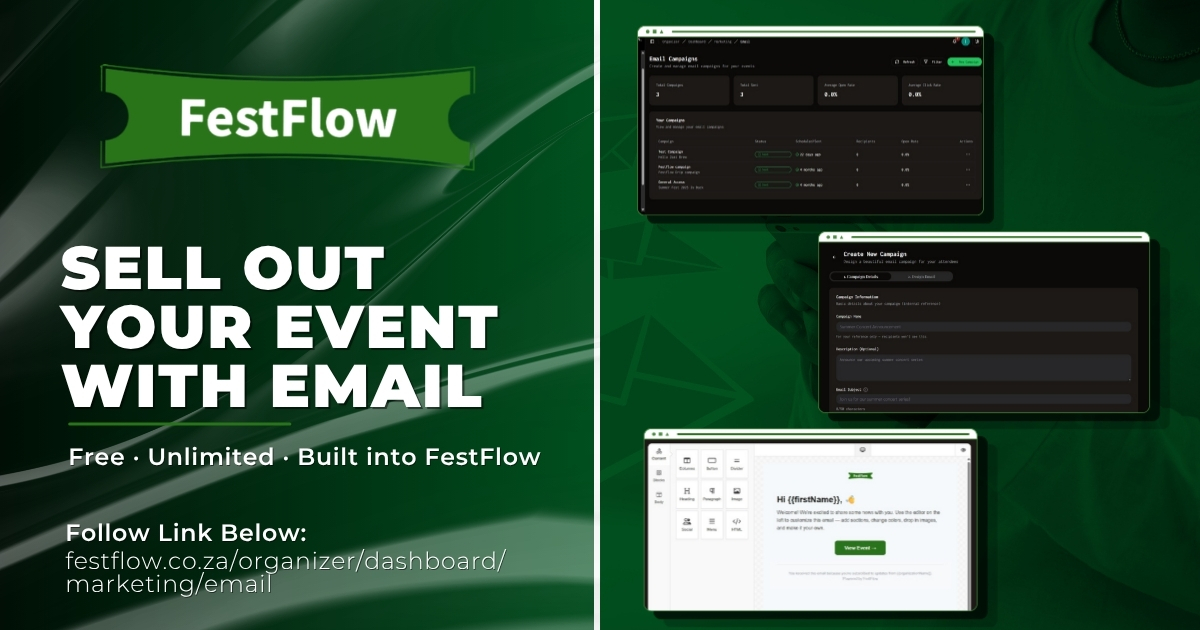
You can send beautifully designed emails to a list of recipients you've built in three ways: pulled directly from your past event attendees on FestFlow, imported from a CSV (past event exports, Excel sheets, contact lists from anywhere), or typed in manually. You design the email with a proper drag-and-drop editor — think Mailchimp-style, no code, no design skills needed — preview it, send a test to yourself, then either send it now or schedule it for the perfect moment. Afterwards you get a full breakdown of opens, clicks, bounces, and which links got the most traffic.
There's no per-email cost. There's no monthly cap. There's no upsell to a "Pro" plan to unlock features. If you've got 50 contacts or 50,000, the price is the same: zero.
Why email still wins for selling tickets
Social posts get seen by maybe 3% of your followers if you're lucky. WhatsApp broadcasts get marked as spam. Paid ads cost money and need constant babysitting.
Email lands in someone's inbox, sits there until they read it, and converts at rates that consistently embarrass every other channel for warm audiences. For event tickets specifically — where the buying decision is emotional, time-sensitive, and based on familiarity with the brand — it's still the single most effective tool an organiser has.
The three audiences you should be emailing
Your past attendees. This is the big one. If someone bought a ticket to your last three events, they're statistically very likely to buy a ticket to your next one — if you actually tell them it exists. On FestFlow, you can pull this list straight from your dashboard. Tick the events you want, tick specific ticket types if you want to get more targeted (for example, only emailing your VIP buyers about a new VIP package), and the contacts get added automatically.
Your existing audience from elsewhere. Got a Mailchimp list? An Excel sheet of WhatsApp group numbers and emails? A CSV of past attendees you exported from another platform? Drop it into the importer and you're done. We don't lock your audience in — bring it with you.
New contacts you collect. Cards swapped at events, sign-ups from your Linktree, people who DM'd you asking about tickets — paste them in manually and they're part of the list.
You can mix and match all three for a single campaign.
The drag-and-drop editor (this is the fun part)
Most email tools fall into one of two camps: too basic to look good (you end up sending plain text that screams "amateur"), or too complicated to actually use without a design degree. We picked something in the middle.
You drag blocks onto the canvas — header, text, image, button, divider, social icons, video embed, two-column layouts, the lot. You change colours, fonts, spacing, and alignment without touching code. You drop in your event poster, add a big "Buy Tickets" button, and the email renders properly on every device.
The thing that makes this actually sell tickets, though, is personalisation. Drop a merge tag like {{firstName}} into your subject line or body, and the system replaces it with each recipient's actual first name when the email goes out. Suddenly the subject line reads "Sarah, your kind of night just dropped 🎶" instead of "Hi all, new event announcement". Open rates climb significantly when emails feel one-to-one instead of one-to-many — and that's before we even talk about how much warmer it makes the whole thing read.
How to send your first campaign — six simple steps
Open Email Campaigns. From your organiser dashboard, click Marketing → Email Campaigns → New Campaign.
Name it and write your subject line. The campaign name is internal (just for you to find it later). The subject line is what your audience sees in their inbox — keep it under 50 characters, make it specific, and consider using
{{firstName}}for that personal touch.Add recipients. Click through to the recipients step and pick your source: "Add Event Attendees" pulls from past events, "Import" takes a CSV, "Manual" lets you paste in emails. You can use all three on the same campaign.
Design your email. Drag in blocks, drop in your event flyer, write your copy, add a clear "Buy Tickets" button linking straight to your event page. Use one of our premade templates if you want a head start.
Send a test to yourself. Always. Hit "Send Test", put in your own email and a co-organiser's email, and check it on your phone before sending to your full list. Catches typos and broken links every time.
Send or schedule. Send now, or schedule for the time your audience is most likely to be at their phone. (For most South African event audiences, that's weekday lunch breaks or 7–9pm.)
That's it. Your first campaign goes out, and you can watch opens and clicks roll in live in the analytics tab.
A few pro tips from running this for two years
Send your first announcement email the day you publish your event, even if tickets aren't quite ready yet. A "save the date" email primes the audience and means your real ticket-launch email lands in a warmer inbox.
For most events, plan three campaigns: an announcement, a reminder a week before, and a "last chance" email 24–48 hours before tickets close or the event happens. Three emails will outperform one for almost every event.
Always run a test send. I cannot stress this enough. Broken images, wrong links, "Hi {{firstName}}" appearing literally — all avoidable with a 30-second test.
Don't write War and Peace. Your event poster does most of the visual work. The email needs a hook, a date, a price, a clear button, and you're done. Long emails get scanned and forgotten.
Watch your analytics on the first campaign and iterate. If your open rate is low, your subject line needs work. If your open rate is good but clicks are low, the email body or button isn't converting. The dashboard tells you exactly which to fix.
The bottom line
If you're spending money on ads to sell tickets while your past attendees sit unread on a spreadsheet, you're working much harder than you need to. Email Campaigns turns that list into the most powerful sales channel you have — and it costs you nothing.
Head to festflow.co.za/organizer/dashboard/marketing/email to send your first one.
Your next event is one good email away from selling out.
Share this post
Written by
FestFlow Admin
FestFlow Team